Endpoints & models
An endpoint is a connection to a model provider. NoTrack Coder can talk to any number of them at once — a cloud API, a local server, an image backend — and you switch between their models from the selector in the top-right of the window. This page is where you set them up.
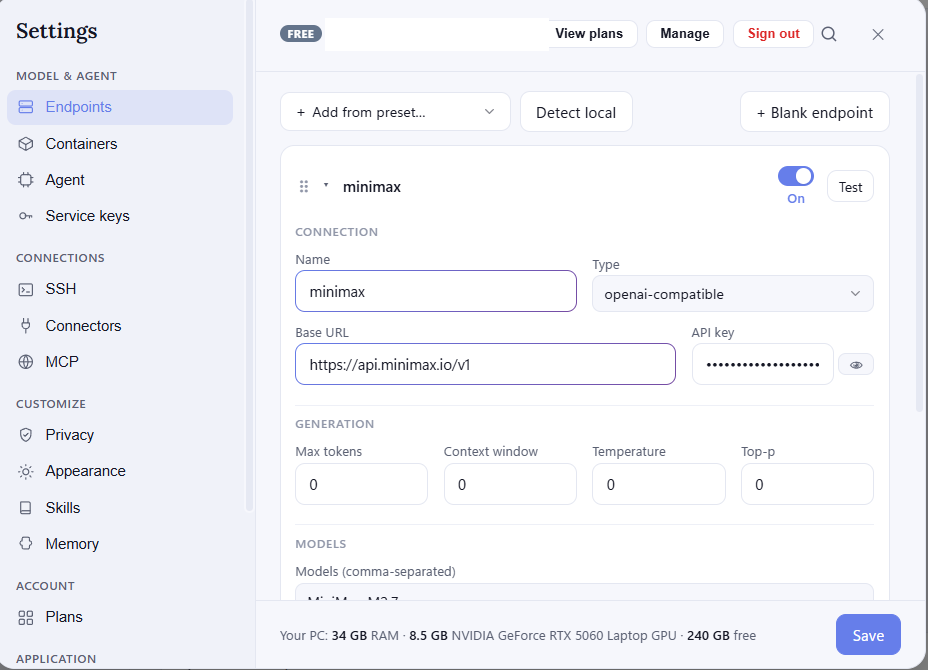
Adding a model
Use Add from preset to pick a known provider and have its address filled in for you, Blank endpoint to enter one by hand, or Detect local to find a model server already running on your computer and add it in one click.
For each endpoint you give it a name, its base URL, an API key if the provider needs one, and the list of models it offers (each model then appears in the selector). Optional fields let you cap reply length, set the context window, and adjust temperature or the system prompt.
Testing
Test checks that the endpoint answers and shows its response time. When the provider reports it, NoTrack Coder also fills in the model's context window for you, so you don't have to look it up.
Turning one on or off
Every endpoint has an On switch. Turn it off to hide its models from the selector while keeping all its settings — handy for parking a provider you're not using right now. Drag the handle on a card to reorder the list.
Editing and removing
Click an endpoint to expand it and change anything; your changes are kept when you close Settings. To remove one, open it and choose Delete endpoint. The endpoints that ship with the app are built-in — you can turn them on or off, but not delete them.
